本區已經依照台灣網站內容分級規定加入分級標籤,
不歡迎也禁止未滿 18 歲的人員進入本區
對多元文化的尊重, 也是對您自己, 以及您工作, 或許也包括對您親人的尊重。
如果您了解, 並可以尊重且遵守以上注意事項, 否則請您關閉並離開此板。
內容可能含有與男性間性行為有關的文字, 如果您無法接受男性間性行為, 或對男性間性行為沒有興趣, 請您選擇「離開
先建立一個 db_executor 並給予 EXECUTE 權限,再將需要添加的成員加入角色即可。
CREATE ROLE [db_executor]
GO

倧齊 發表在 痞客邦 留言(0) 人氣()

image001.jpg
MSDTC
啟用 MSDTC 服務
開始 → 控制台 → 系統管理工具 → 伺服器管理員
設定 → 服務 → Distributed Transaction Coordinator(分散式交易協調器) →
服務啟動類型為自動,服務狀態為已啟動
倧齊 發表在 痞客邦 留言(0) 人氣()

沒想到過這麼久,這裡還是有人會經過晃晃,離上次發文都已經是五年前的事了!

倧齊 發表在 痞客邦 留言(0) 人氣()


列印範圍


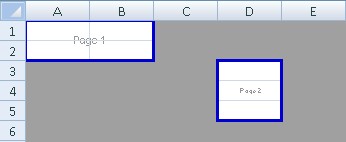
Separate Print Areas


SeparatePrintAreas.jpg


var workbook = new XLWorkbook();
var ws1 = workbook.Worksheets.Add("Separate PrintAreas");
ws1.PageSetup.PrintAreas.Add("A1:B2");
ws1.PageSetup.PrintAreas.Add("D3:D5");


Page Breaks


PageBreaks.jpg


var ws2 = workbook.Worksheets.Add("Page Breaks");
ws2.PageSetup.PrintAreas.Add("A1:D5");
ws2.PageSetup.AddHorizontalPageBreak(2);
ws2.PageSetup.AddVerticalPageBreak(2);
workbook.SaveAs("PrintAreas.xlsx");


========================================


列印 印表機設定


Page Tab Example 1


PageTab1.jpg


var workbook = new XLWorkbook();
var ws1 = workbook.Worksheets.Add("Page Setup - Page1");
ws1.PageSetup.PageOrientation = XLPageOrientation.Landscape;
ws1.PageSetup.AdjustTo(80);
ws1.PageSetup.PaperSize = XLPaperSize.LegalPaper;
ws1.PageSetup.VerticalDpi = 600;
ws1.PageSetup.HorizontalDpi = 600;


For more information on the paper size enumeration please see the Paper Size Lookup Table


Page Tab Example 2


PageTab2.jpg


var ws2 = workbook.Worksheets.Add("Page Setup - Page2");
ws2.PageSetup.PageOrientation = XLPageOrientation.Portrait;
ws2.PageSetup.FitToPages(2, 2); // Alternatively you can use
// ws2.PageSetup.PagesTall = #
// and/or ws2.PageSetup.PagesWide = #
ws2.PageSetup.PaperSize = XLPaperSize.LetterPaper;
ws2.PageSetup.VerticalDpi = 600;
ws2.PageSetup.HorizontalDpi = 600;
ws2.PageSetup.FirstPageNumber = 5;
workbook.SaveAs("PageTab.xlsx");


倧齊 發表在 痞客邦 留言(2) 人氣()

/*取得日期區間內預設工作日*/
CREATE FUNCTION dbo.PL_getDefaultWorkingDays
(
    @StartDate DATE,
    @EndDate   DATE
)
RETURNS INT
AS
BEGIN
    RETURN
        (DATEDIFF(DAY, @StartDate, @EndDate) + 1)
        -(DATEDIFF(WEEK, @StartDate, @EndDate) * 2)
        -(CASE WHEN DATEPART(WEEKDAY, @StartDate) = 1 THEN 1 ELSE 0 END)
        -(CASE WHEN DATEPART(WEEKDAY, @EndDate) = 7 THEN 1 ELSE 0 END)
END
GO

倧齊 發表在 痞客邦 留言(0) 人氣()

EOMONTH (Transact-SQL)
以選擇性位移,傳回包含指定日期的當月最後一天。
SQL Server 2012 版本新增加。
 

倧齊 發表在 痞客邦 留言(0) 人氣()

-------------------------------------------------------------------------------------------------------------------------------
使用方式
-------------------------------------------------------------------------------------------------------------------------------
/*
PL_setTempTable 'XX'
DROP TABLE #TEMP_XX
*/

倧齊 發表在 痞客邦 留言(0) 人氣()

0001.jpg

http://gn00982591.pixnet.net/album/set/18271061

倧齊 發表在 痞客邦 留言(0) 人氣()

.* = application/octet-stream
.001 = application/x-001
.301 = application/x-301
.323 = text/h323
.906 = application/x-906
.907 = drawing/907
.a11 = application/x-a11
.acp = audio/x-mei-aac
.ai = application/postscript
.aif = audio/aiff
.aifc = audio/aiff
.aiff = audio/aiff
.anv = application/x-anv
.asa = text/asa
.asf = video/x-ms-asf
.asp = text/asp
.asx = video/x-ms-asf
.au = audio/basic
.avi = video/avi
.awf = application/vnd.adobe.workflow
.biz = text/xml
.bmp = application/x-bmp
.bot = application/x-bot
.c4t = application/x-c4t
.c90 = application/x-c90
.cal = application/x-cals
.cat = application/vnd.ms-pki.seccat
.cdf = application/x-netcdf
.cdr = application/x-cdr
.cel = application/x-cel
.cer = application/x-x509-ca-cert
.cg4 = application/x-g4
.cgm = application/x-cgm
.cit = application/x-cit
.class = java/*
.cml = text/xml
.cmp = application/x-cmp
.cmx = application/x-cmx
.cot = application/x-cot
.crl = application/pkix-crl
.crt = application/x-x509-ca-cert
.csi = application/x-csi
.css = text/css
.cut = application/x-cut
.dbf = application/x-dbf
.dbm = application/x-dbm
.dbx = application/x-dbx
.dcd = text/xml
.dcx = application/x-dcx
.der = application/x-x509-ca-cert
.dgn = application/x-dgn
.dib = application/x-dib
.dll = application/x-msdownload
.doc = application/msword
.dot = application/msword
.drw = application/x-drw
.dtd = text/xml
.dwf = Model/vnd.dwf
.dwf = application/x-dwf
.dwg = application/x-dwg
.dxb = application/x-dxb
.dxf = application/x-dxf
.edn = application/vnd.adobe.edn
.emf = application/x-emf
.eml = message/rfc822
.ent = text/xml
.epi = application/x-epi
.eps = application/x-ps
.eps = application/postscript
.etd = application/x-ebx
.exe = application/x-msdownload
.fax = image/fax
.fdf = application/vnd.fdf
.fif = application/fractals
.fo = text/xml
.frm = application/x-frm
.g4 = application/x-g4
.gbr = application/x-gbr
.gcd = application/x-gcd
.gif = image/gif
.gl2 = application/x-gl2
.gp4 = application/x-gp4
.hgl = application/x-hgl
.hmr = application/x-hmr
.hpg = application/x-hpgl
.hpl = application/x-hpl
.hqx = application/mac-binhex40
.hrf = application/x-hrf
.hta = application/hta
.htc = text/x-component
.htm = text/html
.html = text/html
.htt = text/webviewhtml
.htx = text/html
.icb = application/x-icb
.ico = image/x-icon
.ico = application/x-ico
.iff = application/x-iff
.ig4 = application/x-g4
.igs = application/x-igs
.iii = application/x-iphone
.img = application/x-img
.ins = application/x-internet-signup
.isp = application/x-internet-signup
.IVF = video/x-ivf
.java = java/*
.jfif = image/jpeg
.jpe = image/jpeg
.jpe = application/x-jpe
.jpeg = image/jpeg
.jpg = image/jpeg
.jpg = application/x-jpg
.js = application/x-javascript
.jsp = text/html
.la1 = audio/x-liquid-file
.lar = application/x-laplayer-reg
.latex = application/x-latex
.lavs = audio/x-liquid-secure
.lbm = application/x-lbm
.lmsff = audio/x-la-lms
.ls = application/x-javascript
.ltr = application/x-ltr
.m1v = video/x-mpeg
.m2v = video/x-mpeg
.m3u = audio/mpegurl
.m4e = video/mpeg4
.mac = application/x-mac
.man = application/x-troff-man
.math = text/xml
.mdb = application/msaccess
.mdb = application/x-mdb
.mfp = application/x-shockwave-flash
.mht = message/rfc822
.mhtml = message/rfc822
.mi = application/x-mi
.mid = audio/mid
.midi = audio/mid
.mil = application/x-mil
.mml = text/xml
.mnd = audio/x-musicnet-download
.mns = audio/x-musicnet-stream
.mocha = application/x-javascript
.movie = video/x-sgi-movie
.mp1 = audio/mp1
.mp2 = audio/mp2
.mp2v = video/mpeg
.mp3 = audio/mp3
.mp4 = video/mpeg4
.mpa = video/x-mpg
.mpd = application/vnd.ms-project
.mpe = video/x-mpeg
.mpeg = video/mpg
.mpg = video/mpg
.mpga = audio/rn-mpeg
.mpp = application/vnd.ms-project
.mps = video/x-mpeg
.mpt = application/vnd.ms-project
.mpv = video/mpg
.mpv2 = video/mpeg
.mpw = application/vnd.ms-project
.mpx = application/vnd.ms-project
.mtx = text/xml
.mxp = application/x-mmxp
.net = image/pnetvue
.nrf = application/x-nrf
.nws = message/rfc822
.odc = text/x-ms-odc
.out = application/x-out
.p10 = application/pkcs10
.p12 = application/x-pkcs12
.p7b = application/x-pkcs7-certificates
.p7c = application/pkcs7-mime
.p7m = application/pkcs7-mime
.p7r = application/x-pkcs7-certreqresp
.p7s = application/pkcs7-signature
.pc5 = application/x-pc5
.pci = application/x-pci
.pcl = application/x-pcl
.pcx = application/x-pcx
.pdf = application/pdf
.pdx = application/vnd.adobe.pdx
.pfx = application/x-pkcs12
.pgl = application/x-pgl
.pic = application/x-pic
.pko = application/vnd.ms-pki.pko
.pl = application/x-perl
.plg = text/html
.pls = audio/scpls
.plt = application/x-plt
.png = image/png
.png = application/x-png
.pot = application/vnd.ms-powerpoint
.ppa = application/vnd.ms-powerpoint
.ppm = application/x-ppm
.pps = application/vnd.ms-powerpoint
.ppt = application/vnd.ms-powerpoint
.ppt = application/x-ppt
.pr = application/x-pr
.prf = application/pics-rules
.prn = application/x-prn
.prt = application/x-prt
.ps = application/x-ps
.ps = application/postscript
.ptn = application/x-ptn
.pwz = application/vnd.ms-powerpoint
.r3t = text/vnd.rn-realtext3d
.ra = audio/vnd.rn-realaudio
.ram = audio/x-pn-realaudio
.ras = application/x-ras
.rat = application/rat-file
.rdf = text/xml
.rec = application/vnd.rn-recording
.red = application/x-red
.rgb = application/x-rgb
.rjs = application/vnd.rn-realsystem-rjs
.rjt = application/vnd.rn-realsystem-rjt
.rlc = application/x-rlc
.rle = application/x-rle
.rm = application/vnd.rn-realmedia
.rmf = application/vnd.adobe.rmf
.rmi = audio/mid
.rmj = application/vnd.rn-realsystem-rmj
.rmm = audio/x-pn-realaudio
.rmp = application/vnd.rn-rn_music_package
.rms = application/vnd.rn-realmedia-secure
.rmvb = application/vnd.rn-realmedia-vbr
.rmx = application/vnd.rn-realsystem-rmx
.rnx = application/vnd.rn-realplayer
.rp = image/vnd.rn-realpix
.rpm = audio/x-pn-realaudio-plugin
.rsml = application/vnd.rn-rsml
.rt = text/vnd.rn-realtext
.rtf = application/msword
.rtf = application/x-rtf
.rv = video/vnd.rn-realvideo
.sam = application/x-sam
.sat = application/x-sat
.sdp = application/sdp
.sdw = application/x-sdw
.sit = application/x-stuffit
.slb = application/x-slb
.sld = application/x-sld
.slk = drawing/x-slk
.smi = application/smil
.smil = application/smil
.smk = application/x-smk
.snd = audio/basic
.sol = text/plain
.sor = text/plain
.spc = application/x-pkcs7-certificates
.spl = application/futuresplash
.spp = text/xml
.ssm = application/streamingmedia
.sst = application/vnd.ms-pki.certstore
.stl = application/vnd.ms-pki.stl
.stm = text/html
.sty = application/x-sty
.svg = text/xml
.swf = application/x-shockwave-flash
.tdf = application/x-tdf
.tg4 = application/x-tg4
.tga = application/x-tga
.tif = image/tiff
.tif = application/x-tif
.tiff = image/tiff
.tld = text/xml
.top = drawing/x-top
.torrent = application/x-bittorrent
.tsd = text/xml
.txt = text/plain
.uin = application/x-icq
.uls = text/iuls
.vcf = text/x-vcard
.vda = application/x-vda
.vdx = application/vnd.visio
.vml = text/xml
.vpg = application/x-vpeg005
.vsd = application/vnd.visio
.vsd = application/x-vsd
.vss = application/vnd.visio
.vst = application/vnd.visio
.vst = application/x-vst
.vsw = application/vnd.visio
.vsx = application/vnd.visio
.vtx = application/vnd.visio
.vxml = text/xml
.wav = audio/wav
.wax = audio/x-ms-wax
.wb1 = application/x-wb1
.wb2 = application/x-wb2
.wb3 = application/x-wb3
.wbmp = image/vnd.wap.wbmp
.wiz = application/msword
.wk3 = application/x-wk3
.wk4 = application/x-wk4
.wkq = application/x-wkq
.wks = application/x-wks
.wm = video/x-ms-wm
.wma = audio/x-ms-wma
.wmd = application/x-ms-wmd
.wmf = application/x-wmf
.wml = text/vnd.wap.wml
.wmv = video/x-ms-wmv
.wmx = video/x-ms-wmx
.wmz = application/x-ms-wmz
.wp6 = application/x-wp6
.wpd = application/x-wpd
.wpg = application/x-wpg
.wpl = application/vnd.ms-wpl
.wq1 = application/x-wq1
.wr1 = application/x-wr1
.wri = application/x-wri
.wrk = application/x-wrk
.ws = application/x-ws
.ws2 = application/x-ws
.wsc = text/scriptlet
.wsdl = text/xml
.wvx = video/x-ms-wvx
.xdp = application/vnd.adobe.xdp
.xdr = text/xml
.xfd = application/vnd.adobe.xfd
.xfdf = application/vnd.adobe.xfdf
.xhtml = text/html
.xls = application/vnd.ms-excel
.xls = application/x-xls
.xlw = application/x-xlw
.xml = text/xml
.xpl = audio/scpls
.xq = text/xml
.xql = text/xml
.xquery = text/xml
.xsd = text/xml
.xsl = text/xml
.xslt = text/xml
.xwd = application/x-xwd
.x_b = application/x-x_b
.x_t = application/x-x_t

倧齊 發表在 痞客邦 留言(0) 人氣()


特殊符号
命名实体
十进制编码
特殊符号
命名实体
十进制编码
特殊符号
命名实体
十进制编码


Α
Α
Α
Β
Β
Β
Γ
Γ
Γ


Δ
Δ
Δ
Ε
Ε
Ε
Ζ
Ζ
Ζ


Η
Η
Η
Θ
Θ
Θ
Ι
Ι
Ι


Κ
Κ
Κ
Λ
Λ
Λ
Μ
Μ
Μ


Ν
Ν
Ν
Ξ
Ξ
Ξ
Ο
Ο
Ο


Π
Π
Π
Ρ
Ρ
Ρ
Σ
Σ
Σ


Τ
Τ
Τ
Υ
Υ
Υ
Φ
Φ
Φ


Χ
Χ
Χ
Ψ
Ψ
Ψ
Ω
Ω
Ω


α
α
α
β
β
β
γ
γ
γ


δ
δ
δ
ε
ε
ε
ζ
ζ
ζ


η
η
η
θ
θ
θ
ι
ι
ι


κ
κ
κ
λ
λ
λ
μ
μ
μ


ν
ν
ν
ξ
ξ
ξ
ο
ο
ο


π
π
π
ρ
ρ
ρ
ς
ς
ς


σ
σ
σ
τ
τ
τ
υ
υ
υ


φ
φ
φ
χ
χ
χ
ψ
ψ
ψ


ω
ω
ω
ϑ
ϑ
ϑ
ϒ
ϒ
ϒ


ϖ
ϖ
ϖ

•
•

…
…


′
′

″
″

‾
‾


⁄
⁄

℘
℘

ℑ
ℑ


ℜ
ℜ

™
™

ℵ
ℵ


←
←

↑
↑

→
→


↓
↓

↔
↔

↵
↵


⇐
⇐

⇑
⇑

⇒
⇒


⇓
⇓

⇔
⇔

∀
∀


∂
∂

∃
∃

∅
∅


∇
∇

∈
∈

∉
∉


∋
∋

∏
∏

∑
−


−
−

∗
∗

√
√


∝
∝

∞
∞

∠
∠


∧
⊥

∨
⊦

∩
∩


∪
∪

∫
∫

∴
∴


∼
∼

≅
≅

≈
≅


≠
≠

≡
≡

≤
≤


≥
≥

⊂
⊂

⊃
⊃


⊄
⊄

⊆
⊆

⊇
⊇


⊕
⊕

⊗
⊗

⊥
⊥


⋅
⋅

⌈
⌈

⌉
⌉


⌊
⌊

⌋
⌋

◊
◊


♠
♠

♣
♣

♥
♥


♦
♦


¡
¡
¡


¢
¢
¢
£
£
£
¤
¤
¤


¥
¥
¥
¦
¦
¦
§
§
§


¨
¨
¨
©
©
©
ª
ª
ª


«
«
«
¬
¬
¬
­
­
­


®
®
®
¯
¯
¯
°
°
°


±
±
±
²
²
²
³
³
³


´
´
´
µ
µ
&#181
"
"
"


<
&lt;
&#60;
>
&gt;
&#62;
'
 
&#39;

倧齊 發表在 痞客邦 留言(0) 人氣()

子查詢
子查詢意指巢狀結構存在於SELECT、INSERT、UPDATE、DELETE敘述中的SELECT查詢。子查詢可在巢狀子查詢 ,子查詢為join關聯資料子查詢與無關聯資料使用in(某段SELECT資料來源),在效能表現上關連子查詢會較無 關聯子查詢表現較優。
-- 使用子查詢來檢查是否符合
--關連查詢
SELECT DISTINCT s.PurchaseOrderNumber
FROM Sales.SalesOrderHeader s
WHERE EXISTS ( SELECT SalesOrderID
FROM Sales.SalesOrderDetail
WHERE UnitPrice BETWEEN 1000 AND 2000 AND
SalesOrderID = s.SalesOrderID)
--無關連子查詢
SELECT SalesPersonID,
SalesQuota CurrentSalesQuota
FROM Sales.SalesPerson
WHERE SalesQuota IN
(SELECT MAX(SalesQuota)
FROM Sales.SalesPerson)

倧齊 發表在 痞客邦 留言(0) 人氣()


If the results table of your stored proc is too complicated to type out the "create table" statement by hand, and you can't use OPENQUERY OR OPENROWSET, you can use sp_help to generate the list of columns and data types for you. Once you have the list of columns, it's just a matter of formatting it to suit your needs.
Step 1: Add "into #temp" to the output query (e.g. "select [...] into #temp from [...]").
The easiest way is to edit the output query in the proc directly. if you can't change the stored proc, you can copy the contents into a new query window and modify the query there.
Step 2: Run sp_help on the temp table. (e.g. "exec tempdb..sp_help #temp")
After creating the temp table, run sp_help on the temp table to get a list of the columns and data types including the size of varchar fields.
Step 3: Copy the data columns & types into a create table statement
I have an Excel sheet that I use to format the output of sp_help into a "create table" statement. You don't need anything that fancy, just copy and paste into your SQL editor. Use the column names, sizes, and types to construct a "Create table #x [...]" or "declare @x table [...]" statement which you can use to INSERT the results of the stored procedure.
Step 4: Insert into the newly created table
Now you'll have a query that's like the other solutions described in this thread.
DECLARE @t TABLE
(
--these columns were copied from sp_help
COL1 INT
,
COL2 INT
)
INSERT INTO @t
Exec spMyProc

This technique can also be used to convert a temp table (#temp) to a table variable (@temp). While this may be more steps than just writing the create table statement yourself, it prevents manual error such as typos and data type mismatches in large processes. Debugging a typo can take more time than writing the query in the first place.


If you're lucky enough to have SQL 2012 or higher, you can use dm_exec_describe_first_result_set_for_object


I have just edited the sql provided by gotqn. Thanks gotqn.


This creates a global temp table with name same as procedure name. The temp table can later be used as required. Just don't forget to drop it before re-executing.


 declare @procname nvarchar(255) = 'myProcedure',
@sql nvarchar(max)
set @sql = 'create table ##' + @procname + ' ('
begin
select @sql = @sql + '[' + r.name + '] ' + r.system_type_name + ','
from sys.procedures AS p
cross apply sys.dm_exec_describe_first_result_set_for_object(p.object_id, 0) AS r
where p.name = 'myProcedure'
set @sql = substring(@sql,1,len(@sql)-1) + ')'
execute (@sql)
execute('insert ##' + @procname + ' exec ' + @procname)
end


倧齊 發表在 痞客邦 留言(6) 人氣()

Blog Stats
⚠️

成人內容提醒

本部落格內容僅限年滿十八歲者瀏覽。
若您未滿十八歲,請立即離開。

已滿十八歲者,亦請勿將內容提供給未成年人士。
